
This love and deepspace best teams piece is really a Home routing guide. The official 6.0 notes list a new Room plus Cooking and Handicraft, along with Design Mode, Pose Mode, My Mood, a richer Weather system and a lighter Gardening experience, and state that Home rewards total over 6,000 Diamonds. The love and deepspace companion tier list 2026 angle at the end gives the claim order so you do not sink all your time into one module.
 Applicable version: 6.0 "A Shattered Quiet" (live 2026-07-08, current store version 6.0.0)
Love and Deepspace 6.0 overview: Home becomes the main loop
The official 6.0 notes open a new Room and add Cooking and Handicraft features, while also enabling Design Mode, Pose Mode and My Mood, a richer Weather system and a more relaxed Gardening experience .
Open the three-piece core first
This patch turns the home from a backdrop into a usable space: cooking and handicraft both happen inside the room, which finally gives the room a purpose.
The room is the container; cooking and handicraft are the outputs. Get the room to the point where you can cook and reach the handicraft bench, and every later module has somewhere to live. Reverse that order and you end up with features unlocked and nowhere to use them.
The second half is photography and collection
AR Photobooth and the Stash feature are the other half of 6.0 . They do not touch combat power; they touch collection completeness and album coverage, so they belong after the daily loop is stable.

Love and Deepspace cooking and handicraft: run cheap recipes first
Cooking and handicraft both follow a material-in, time-wait, item-out loop. Early on, the right move is to run low-cost recipes to establish the loop rather than chasing expensive ones.
Cooking: pick what you can repeat
Only repeatable dishes give steady output, and finished dishes can feed back into handicraft as materials. The first cook of a new recipe unlocks the index entry, but an unlock is not income. Lock in the two or three dishes you can make daily so material spend stays controllable.
Handicraft: work backwards from materials
Handicraft special items usually need specific materials, and those materials come from more than one place: daily interactions, gardening output and event exchanges. Read what your inventory supports before deciding what to craft, which beats forcing a shopping list. Finished pieces can be placed in the room or used as photo props.
Love and Deepspace AR Photobooth: how scenes unlock
AR Photobooth is the new photo feature in 6.0 . Its collection logic is usually scene plus pose plus mood, and missing one piece means you cannot get the shot.
Unlock pose and mood first
Pose Mode and My Mood directly control available actions and expressions. Run those two modules once before shooting scenes, and you skip a round of reshoots that would otherwise eat the time you meant to spend on collection.
Weather moves
The 6.0 weather system changes how a scene reads . The same location on a clear day and in rain produces two different photos, so when the weather you want shows up, finish that set first.
In practice, shoot the fixed scene-and-pose frames first, then wait for weather variants. Doing it the other way means a weather change forces you to rebuild the whole set.

Love and Deepspace Design Mode and Gardening: the passive tracks
Design Mode handles room decoration and Gardening handles output . Both share one property: they keep running on their own.
Gardening is the long-cycle track
Gardening has a longer cycle than cooking or handicraft and steadier returns, so plant it first and harvest last. Treat it as a background task and click once a day rather than batching it, and keep the plots rotating so you always have something in the ground while another bed finishes.
Do not fill every slot in Design Mode
The pleasure of Design Mode is rearranging, and furniture is finite. Filling every slot immediately leaves nowhere to put new pieces later, and leaving gaps saves you from reshuffling.

Love and Deepspace 6.0 Diamonds: how to claim the 6,000
The official notes state that Home-related rewards total more than 6,000 Diamonds . That number is not a single payout; it follows module progress.
Push modules, not days
Split the 6,000 across the room, cooking, handicraft and photo tracks, and when one stalls, push another track instead of pushing the same button harder. Grinding by day produces empty loops where today's tasks are done but the reward has not unlocked.
Do not skip story to farm Diamonds
Home modules are bound to companion interactions, and skipping them drops unlock conditions. Diamonds are the result and interaction is the path; the order cannot flip. If time is short, prioritise interactions with dialogue and leave pure-operation tasks for last, because payout nodes usually follow interaction progress rather than action counts.

Love and Deepspace 6.0 FAQ
When did 6.0 launch?
A: The store record shows 2026-07-08, titled A Shattered Quiet, version 6.0.0 .
How many Diamonds do Home rewards total?
A: The official notes state more than 6,000 Diamonds, claimed in stages as modules progress .
Which module first?
A: The room first, then cooking and handicraft, then AR Photobooth and Design Mode.
Does gardening need daily clicks?
A: Yes. Gardening has a long cycle and a daily click beats batching the whole week.
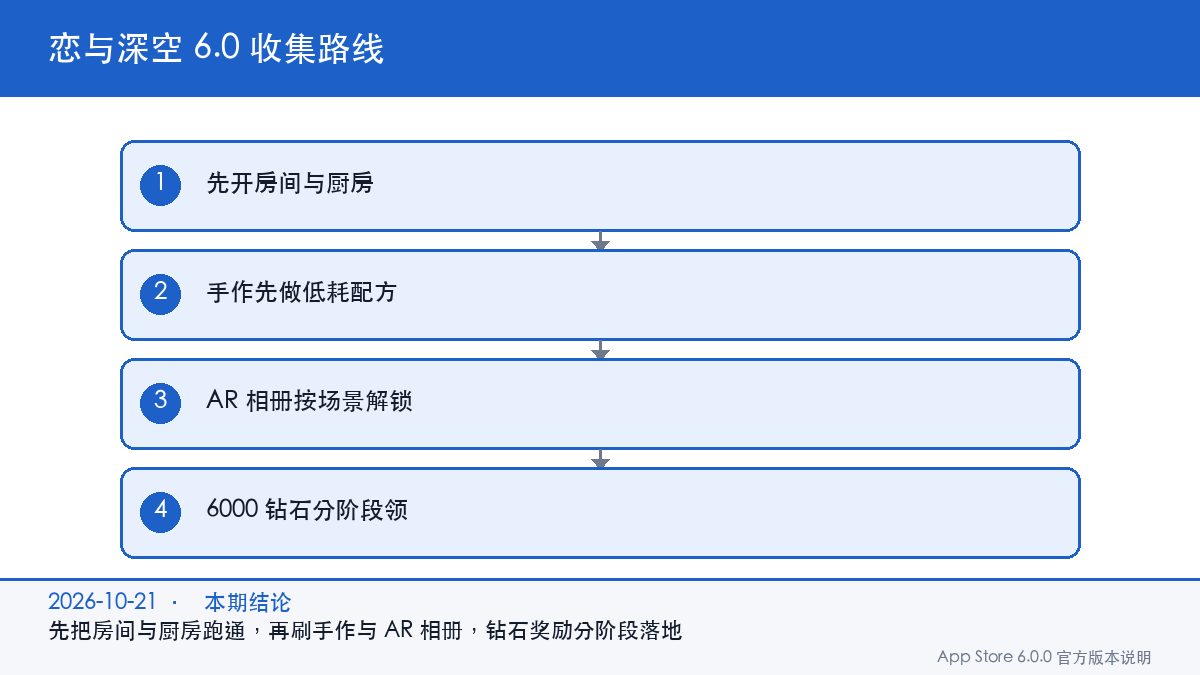
Love and Deepspace 6.0 action list
- Get the room to the point where cooking and handicraft work.
- Lock in two or three cheap repeatable recipes instead of expensive ones.
- Plant gardening early and click once a day.
- Unlock pose and mood before shooting AR Photobooth scenes.
- Claim the 6,000 Diamonds by pushing modules, not by grinding days.
Later 6.0 content follows official notices, and gghubs.com updates the Home route when a new version lands.