
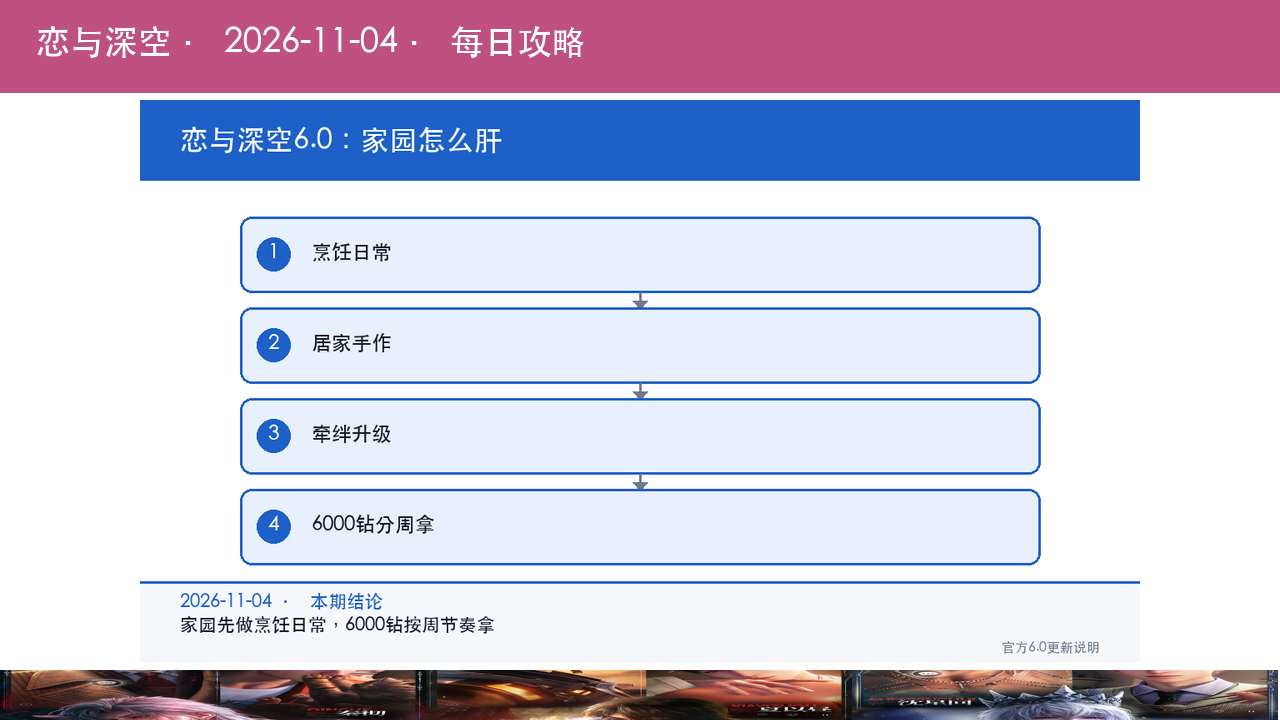
This Love and Deepspace 6.0 home guide treats one thing as settled: the home system is not decoration. It is a quest chain that pays out over 6,000 diamonds, and the way to collect is to finish cooking and handicraft dailies before you touch anything cosmetic.
| Item | Verdict | Evidence |
|---|---|---|
| Version | 6.0 "All Things Resound", live 2026-07-08 | Official patch notes |
| Core systems | Home, cooking, handicraft, bond | Same |
| Diamond total | Over 6,000 diamonds from home play | Same |
| Daily minimum | Cooking, handicraft, home dailies | See resource plan |
| Worth grinding? | Yes if you need diamonds, dailies only if time is short | See verdict |
Love and Deepspace 6.0 overview: what actually changed at home
Applicable version: 6.0 "All Things Resound" (launched 2026-07-08)
New room, cooking and handicraft
6.0 opens a new Room and folds Cooking and Home Handicraft into the home routine. Cooking produces dishes, handicraft produces keepsakes, and both tie into the home's record and mood systems (source: official 6.0 notes). These are not cosmetics. They are wired directly into the diamond milestones.
Expanded systems
The same patch adds Photo Studio, the Wardrobe Vault, and three widgets (Step by Step, One Word One Thought, Household Matters), while upgrading Cat Misses You and Photo Display. The Bond system's level cap goes up, Confide content expands, and the Lemon Surprise House pool gets new entries (source: official notes). All of it is upside, but the main line is still the home quest chain.

Love and Deepspace 6.0 diamonds: where the 6,000 comes from
How the payout is structured
The official wording is a total: "more than 6,000 diamonds" accumulated through home play. That means it is not a single grant. It is spread across milestones such as cooking counts, handicraft completion, room layout, weather and gardening micro-tasks (source: official notes). Since the notes do not break down each figure, the correct move is to open the home task list and mark every milestone you have not claimed.
It is not a login bonus
One correction worth making: the rule is not "log in every day and the 6,000 arrives", it is "push the milestones and you get paid". Logging in only covers the daily slice. The bulk sits in stage goals that require you to cook, craft and decorate on purpose.
Daily versus weekly
Daily: cook once, craft once, clear the home dailies. That is roughly 10 to 15 minutes. Weekly: finish the milestones unlocked that week, especially room layout and gardening goals, which tend to pay larger one-time amounts. The exact daily cap is not published, so check the in-game task panel.

Love and Deepspace 6.0 bond and photography: worth the time?
Bond level cap increase
The Bond cap rises in 6.0, so bonds you had maxed can keep climbing (source: official notes). Bond levels unlock story and interaction content rather than combat power, which makes it long-term value rather than immediate gain.
Photo Studio and Pose Mode
Photo Studio offers a deeper photography loop, and Pose Mode plus Design Mode lets you stage scenes (source: official notes). This is content for people who enjoy taking photos. If you only chase progression, skip it.

Love and Deepspace 6.0 resource plan: spending wishes and diamonds
Claim the freebies first
The 6.0 welfare list includes a selector for a four-star Memory, a stack of wish tickets, diamonds, selected outfits, photo backdrop animations and pose sets (source: official notes). The four-star selector is free value, so claim it first. Save wish tickets for a limited banner you actually want.
Where diamonds should go
Diamonds belong in two places: limited Memory pulls and the occasional stamina or attempt refill. The 6,000 from home is a long accumulation, so do not dump it into the current banner unless a limited card is running and you are a few pulls from pity.

Love and Deepspace 6.0 home layout and weather: the photo budget
Weather and gardening
6.0 builds weather into the home and lightens gardening, described officially as a richer weather system and an easier gardening experience (source: official notes). In practice, different weather changes the tone of your photos, and gardening output follows the weather cycle. If you want good shots, pick the weather before you enter, not during a rainstorm.
One-time value in room layout
Room layout ties into Design Mode and Pose Mode, and a finished layout can be reused for shooting indefinitely. That makes it one-time input with long-term return. Set the base layout once and adjust details later instead of rearranging furniture every day.

Love and Deepspace 6.0 and the story loop
The 6.0 main story and the home system run on separate tracks: story advances through stamina and stages, home advances through daily play (source: official notes). Their resources do not overlap, so do not pour stamina into home content. Home consumes no stamina and is a tap-and-collect layer. Story and limited banners are what actually gate progress; home is the steady diamond trickle.
Is the 6.0 home worth grinding?
Verdict: worth it if you need diamonds and a free four-star Memory, and daily-only if you are a veteran short on time.
- New and returning accounts: grind it. 6,000 diamonds plus a four-star selector is real starting capital.
- Mid-game accounts: do the dailies. Ten to fifteen minutes a day, milestones as they come.
- Story-only veterans: skip photos and decorating, pick up bond levels along the way.
Love and Deepspace 6.0 daily loop: three steps
- Cook once when you enter the home; dishes and mood records settle together.
- Craft once next, topping up materials from home output.
- Scan the milestone list for anything newly unlocked, especially room and gardening goals.
Love and Deepspace 6.0 FAQ
Is the 6,000 diamonds a one-time grant?
A: No. The official wording is that home play accumulates more than 6,000 diamonds across milestones, so you have to push the tasks.
How long does the daily take?
A: About 10 to 15 minutes for cooking, handicraft and the home dailies, with milestones on top.
What does the raised bond cap do?
A: It unlocks more story and interaction content. It is long-term value, not combat power.
How should I use the four-star selector?
A: Fill the gap in your main card set. The available pool is listed on the in-game event page.
Action checklist
- Cook and craft once today to clear the home dailies.
- Scan the milestone list and mark unclaimed diamond rewards.
- Claim the four-star selector before the event closes.
- Save wish tickets for limited banners, not the standard pool.
- Batch furniture and layout work once a week instead of daily fiddling.
If you want the earlier 5.x home routines for comparison, GameHub's anime-game guide section keeps them archived alongside this one.