how the Love and Deepspace 6.0 Home System works, covering Room, Cooking, Handicraft and Design Mode, how to prioritise Diamonds and pulls in October, and the device and install requirements. Version and reward data come from the official App Store release notes updated 2026-07-08, with past events per official announcements, and a fuller archive lives on GameHub's guides hub.
 Applicable version: 6.0.0 (official store version, updated 2026-07-08)
Love and Deepspace 6.0 Home System overview: Room, Cooking and Handicraft
The headline addition in 6.0 "A Shattered Quiet" is the Home System, which the official notes break into three interactive modules . It exists to give you something to do every day rather than to push a power number upward.
What Room, Cooking and Handicraft each do
The newly opened Room supports Cooking and Handicraft, letting you cook meals and craft items while recording everyday moments together . The point of the Love and Deepspace 6.0 Home System is not stat gains but repeatable daily content.
Design Mode and Pose Mode
The same patch adds Design Mode, Pose Mode and My Mood, along with a richer weather system and an easier Gardening loop . These sit in the dress-up and interaction layer and do not gate story progress. Players who enjoy photos and layouts will sink hours in; story-only players can skip past.
Love and Deepspace 6.0 Home System: how to start
Run the tutorial once, then talk efficiency.
Begin from your main story progress
The Home System's entry point keys off main story progress, so push the current chapter to the unlock point before settling into dailies. Chasing rewards first just leaves you stuck at the unlock gate. On patch day, the right move is to clear the progress gate, then settle into the loop.
Where the 6,000 Diamonds come from
The official line promises over 6,000 Diamonds for completing Home System content . Play it at a daily pace rather than in one grind; Diamonds are a long-term currency, so bank them first and plan pulls afterwards.

Love and Deepspace October planning: Diamonds and event priority
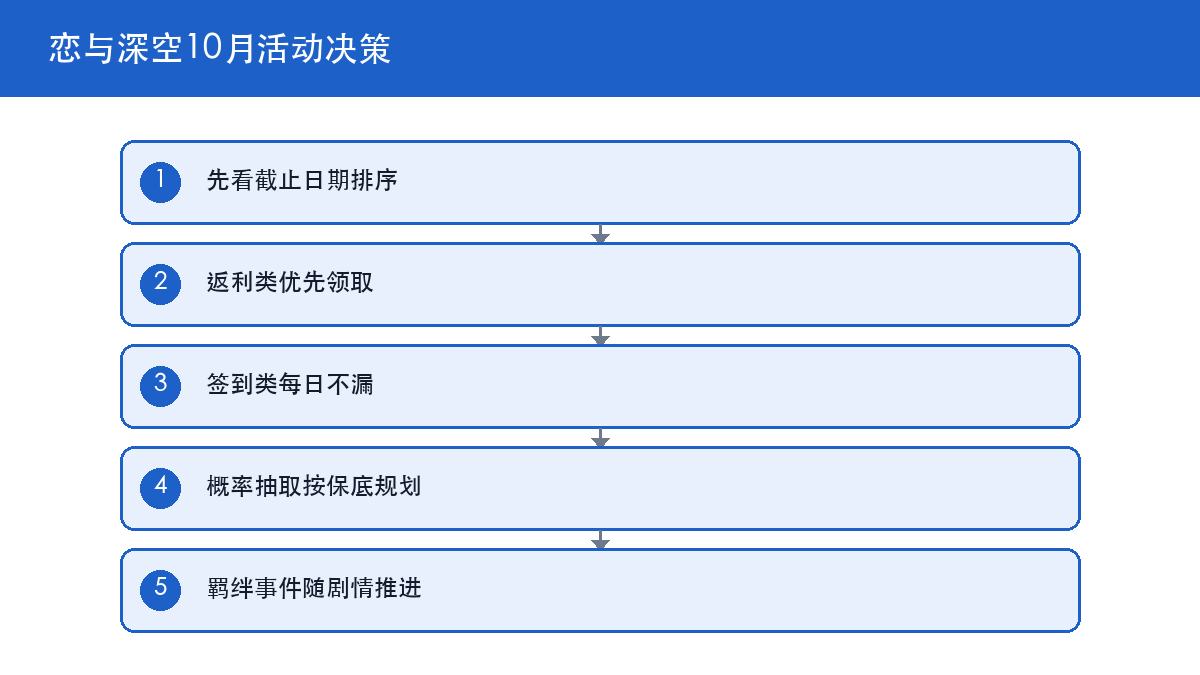
Order October by deadline, not by reward size.
| Priority | Content | Test | Why here |
|---|---|---|---|
| 1 | Rebate and gift-backs | Has a deadline | Cannot be claimed late |
| 2 | Daily sign-in | Resets daily | A missed day is lost |
| 3 | Home dailies | Permanent | Do any time |
| 4 | Probability pulls | Has pity | Save first, pull later |
Why rebates and sign-ins lead
Rebate content cannot be recovered once missed, and a missed sign-in day is a lost day of accumulation . Neither takes long, so clearing them first is the least effort. To tell which bucket an event falls into, look for a countdown on its screen: if there is one, move now; if not, it can wait.
Why pulls come last
Pulls need a full resource pool before you commit, and pulling early on a thin stock just lowers your odds . Collect the free resources first, then decide whether this month is a pull month.

Love and Deepspace 6.0 device and install requirements
Two lines checked before you start save a reinstall later.
Install size and system requirement
Version 6.0.0 lists an install of about 3.5 GB on the official store with a minimum of iOS 13.0 . Clear the space before updating so the install does not fail midway.
Rating and player sentiment
The current official store rating sits around 2.9 across roughly 61,400 ratings . Treat the rating as a reference only and follow the official notes for actual content, since fresh-update ratings often reflect gacha luck rather than patch quality.

Love and Deepspace free-to-play monthly rhythm
The free-to-play rhythm is simple: take guaranteed value, then gamble.
The fixed monthly routine
Sign-ins, Home dailies and story progress form the fixed routine, and all three are guaranteed value . The key to a Love and Deepspace free-to-play rhythm is not frugality but never missing a step. Skip a sign-in day and you have permanently thrown away that day's free resources, a worse loss than one extra pull.
When to actually spend Diamonds
Only spend when a character rerun or event has a clear pity plan. Without a plan, keep saving; Diamonds do not lose value by sitting there. That matters most for free-to-play players: the pool is fixed, so spending early is spending away your future options.

Love and Deepspace FAQ
How do you unlock the Home System?
A: The entry keys off main story progress, so push the chapter to the unlock point before doing Home dailies .
How many Diamonds does 6.0 pay out?
A: The official line is over 6,000 Diamonds from completing Home System content .
How much storage does the install need?
A: The official store lists about 3.5 GB with a minimum of iOS 13.0 .
What should you do first in October?
A: Sort by deadline: claim rebates first, never miss a sign-in, run Home dailies whenever, and pull only once you have saved enough .
Should free-to-play players save Diamonds?
A: Yes. Spend only under a clear pity plan and hold the rest .
Love and Deepspace action list
- Push main story to the Home System unlock before settling into dailies.
- Treat the 6.0 Home rewards as a 6,000-plus Diamond pool and play at a daily pace.
- Work October in order: rebates, sign-ins, Home dailies, then pulls.
- Before updating, confirm about 3.5 GB free and iOS 13.0 or above.
- Without a pity plan, do not spend Diamonds; hold for a clear target.