
The 6.0 update, "All Sounds Arise," is now live. Every major patch brings the same situation:Love and Deepspace beginner's guides pile up by the dozen, and it is hard to know where to start. This time we went through the official patch notes and tested everything hands-on, and only two features are truly worth your time: Real-Scene Photos and the Locked Closet. Photos are no longer just casual screenshots, and the Locked Closet takes the annoyance out of random outfits. That said, collecting the full 6,000 Diamonds the devs promised requires keeping up with both the photo mode and your Home, and following a single track will not be enough.
Real-Scene Photos: Photos Finally Come with Rewards
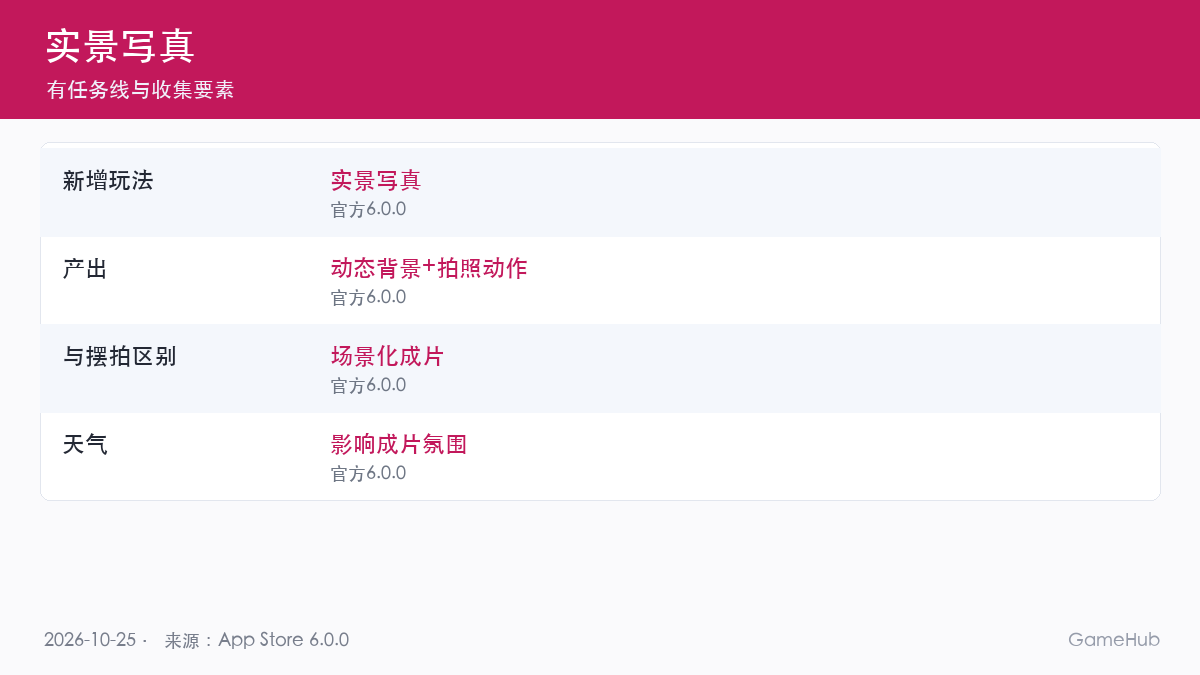
Love and Deepspace 6.0 Real-Scene Photos are a brand-new photo mode introduced in 6.0. The official description reads "unlock a richer photo experience with him." It still sounds like plain photography, but it really is not. It is also very different from Pose Mode inside your Home: Pose Mode is for shooting inside the house, while Real-Scene Photos is all about the "real scene" part, and the results look and feel completely different.
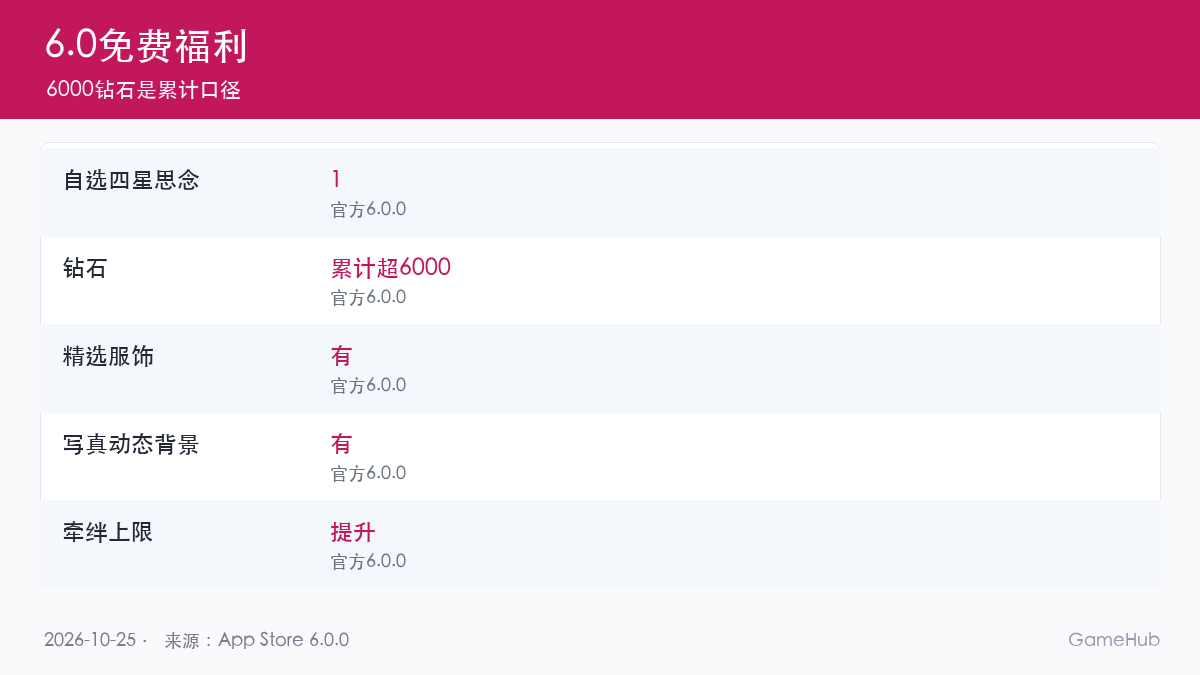
Real-Scene Photos vs. Regular Photos
Regular photos end the moment you tap the shutter. Real-Scene Photos work differently: they come with missions and collection objectives, and completing those missions rewards you with dynamic photo backgrounds and new camera actions. In other words, this mode has a progress bar, so you have to work through it step by step, and snapping a couple of casual shots will not earn you anything.
So if you want every dynamic background, plan on clearing the full mission list; shooting only the scenes you like will not complete the set. The "dynamic photo backgrounds and camera actions" are part of 6.0's free rewards, and there is no other way to obtain them. They can only be earned while the event is running: miss the window and there is nowhere to make it up, so do not slack off while you can still shoot.
How the Weather System Affects Your Photos
The weather system has been expanded in 6.0 as well, and its effect on your photos is immediate. The same scene shot on a sunny day versus a rainy day looks worlds apart.
If you are after a specific mood, you will have to wait for the matching weather; forcing the shot will never capture the feeling. Your collection progress is therefore at the mercy of the forecast, and rushing it is pointless. Just be patient and let the right weather come to you.
The Locked Closet: Random Outfits Are Finally Under Your Control
That covers photos, so now let us talk outfits. The Locked Closet is a new feature in 6.0, officially described as a way to "make his random outfits more to your liking." Simply put, the random outfit rotation in your Home finally takes your preferences into account.
What the Locked Closet Fixes
The most annoying part of random outfits is drawing a look you dislike. What the Locked Closet does is beautifully simple: ourLove and Deepspace 6.0 pull advice is to lock away any outfit you do not want, and it will never show up in the random pool again.
We tested it ourselves: you will need to lock away three or four outfits in a row before the random pool clearly tilts toward your preferred style. Usage is straightforward; whenever an outfit you dislike appears, lock it away, and after a few rounds the pool cleans itself up. It is not a one-time setting but an ongoing filter, and the looks you love are built up slowly over time.
Desktop Widgets: How to Place the Three New Additions
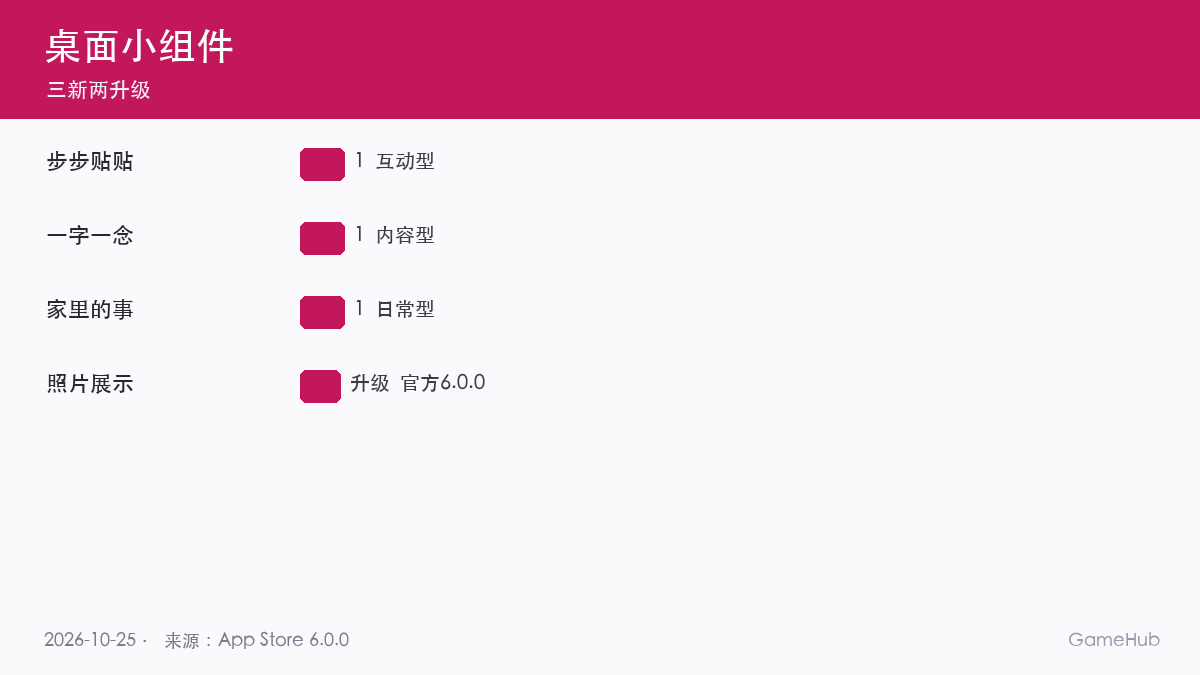
With photos and outfits sorted, let us look at your desktop. This version adds three new widgets: Step by Step, One Word, One Thought, and Home Matters, while the older Kitty Misses You and Photo Showcase widgets have been upgraded. The official wording is as sweet as ever: let him keep you company on your desktop, every moment of the day.
Step by Step leans interactive, while One Word, One Thought leans content-driven. Your desktop only has so much room, and crowding it just makes a mess, so one interactive widget plus one content widget is plenty. There is no need to display all five.
Home Matters brings your Home's daily to-dos straight to the desktop, making it perfect for players who log in every day to manage their Home. If you like to handle Home tasks during your commute, this widget is far more practical than Photo Showcase.
Home Gameplay and Affinity: How to Plan Your Daily Time
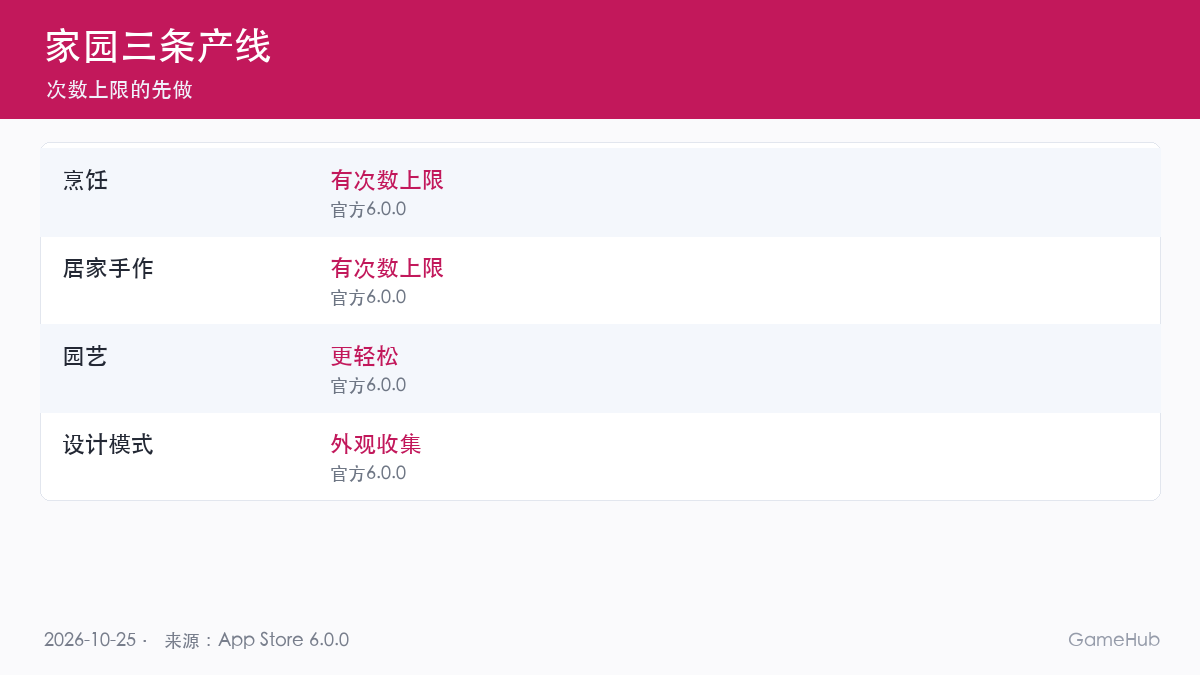
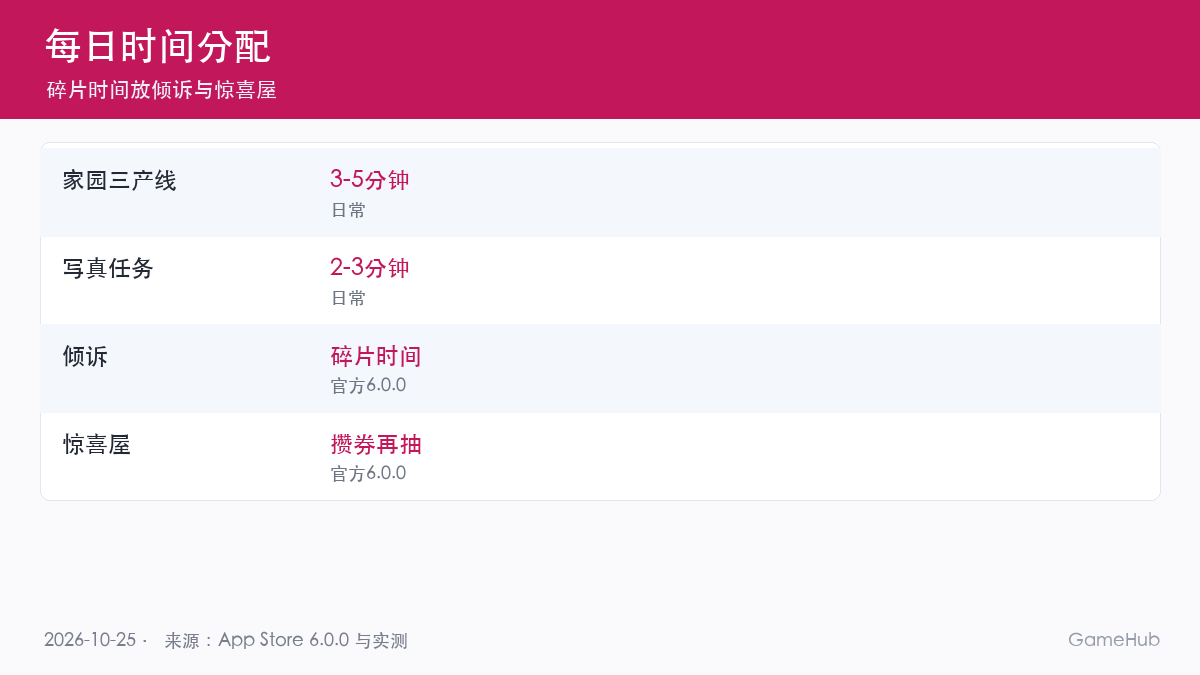
Now that you know the features, the question is how to fit them into your day. 6.0's Home content is substantial: three production lines (Cooking, Home Crafts, and Gardening), plus Design Mode, Pose Mode, and My Moods, on top of the weather system mentioned earlier. Real-Scene Photos draws from the same daily time budget as all of these, and a day only has so many hours, so plan accordingly.
Where the 6,000 Diamonds Come From
The official wording is explicit: "Experience the various gameplay features in the refreshed Home to accumulate over 6,000 Diamonds in generous rewards." The key word is "accumulate," which means this is not something you can finish on day one. Take it slow; there is no need to rush.
Since the total is spread across "various gameplay features," skipping an entire line means losing a chunk of the rewards. Our advice is to touch all three production lines and the photo mode every day; it only takes a moment, and the Diamonds will pile up before you know it.
That said, do not mix Pose Mode and Real-Scene Photos in the same session. Pose Mode is shot inside your Home and produces casual, everyday snapshots, while Real-Scene Photos is about cinematic, scene-driven shots. The two have separate reward pools, and mixing them up makes it easy to miss the photo-exclusive dynamic backgrounds, and only discovering that after you are done shooting is the real waste.
Heart-to-Heart and Lemon's Surprise House
6.0 also updated the Heart-to-Heart content and launched the new Lemon's Surprise House prize pool, with past limited-time rewards making a comeback. Heart-to-Heart is a low-cost daily interaction, while the Surprise House requires lottery tickets.
Neither of these eats into your Home's daily attempts, so both can be done in spare moments. Clear your Heart-to-Heart on the commute, save up your tickets, and open the Surprise House once you have enough, which is far easier than carving out dedicated time.
The Affinity Cap Has Been Raised
6.0 raises the level cap on Affinity. Characters you had already maxed out can now be leveled further, and the interaction resources left idle by the old cap are useful again.
The higher cap does not change how Affinity is earned; there are simply more levels to climb. Maxed-out characters have room to grow once more, and resources that had gone unused at the old ceiling can finally be spent.
The devs have not announced the exact new cap in the patch notes, so check the in-game interface for the real number. Either way, if you can keep leveling, keep leveling.
Love and Deepspace 6.0 FAQ
Where Do I Find Real-Scene Photos?
A: It is a new mode under 6.0's expanded system gameplay. The entrance sits in the game's photo-related menus, so check in-game for the exact location.
Is the Locked Closet a One-Time Setting?
A: No. It is an ongoing filter: lock away any random outfit you dislike, and the pool adjusts accordingly.
How Long Does It Take to Collect All 6,000 Diamonds?
A: Officially, over 6,000 Diamonds can be accumulated across the Home's various gameplay features. They are cumulative rewards spread across multiple activity lines.
How Many Widgets Can I Place at Most?
A: Three new widgets plus two upgraded ones. How many your desktop allows depends on system limits, but we recommend keeping one interactive and one content widget.
By How Many Levels Was the Affinity Cap Raised?
A: The devs have not revealed the exact new cap, only that the level limit has been raised, so check the in-game interface.
Love and Deepspace 6.0 Action Checklist
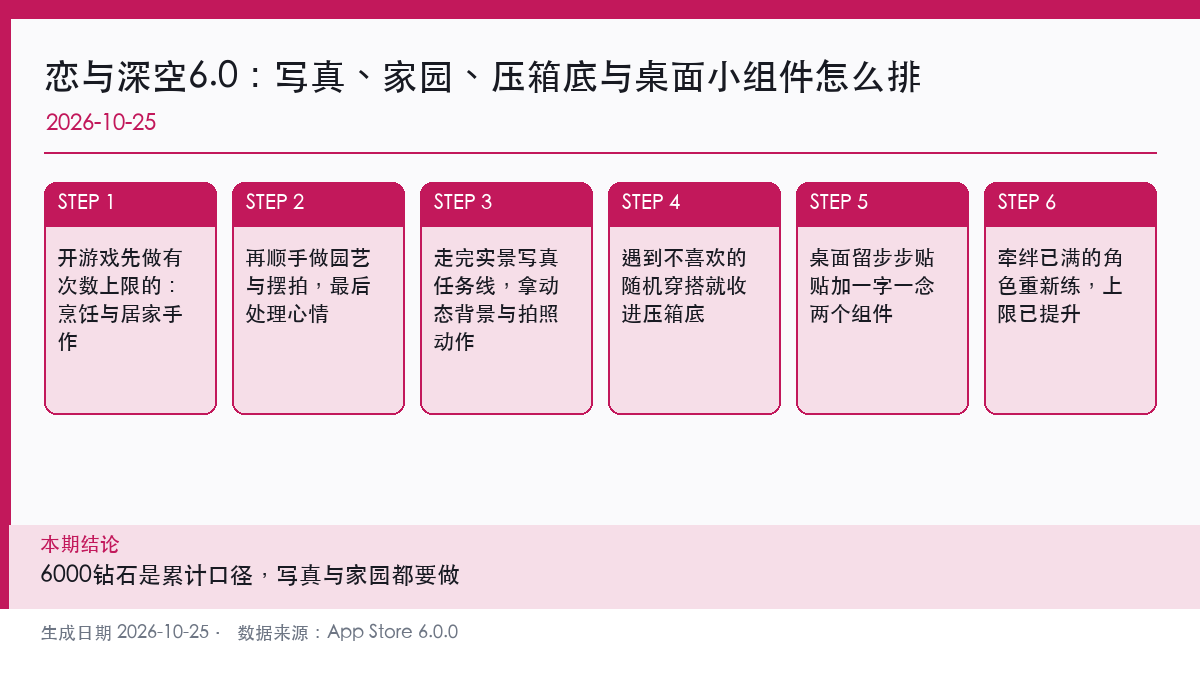
- Clear the Real-Scene Photos mission line to earn the dynamic backgrounds and camera actions.
- Run each of the three Home production lines once a day; the 6,000 Diamonds are cumulative.
- Lock away any random outfit you dislike in the Locked Closet, and repeat as needed.
- Keep one interactive widget (Step by Step) and one content widget (One Word, One Thought) on your desktop.
- Resume leveling characters whose Affinity was already maxed; the cap has been raised.
Specific values in 6.0 may change with minor updates. This guide is based on the official App Store 6.0.0 patch notes, and any figure the devs have not published is marked as subject to the in-game interface. For a full checklist of Home and photo-mode content, see the current Love and Deepspace section at gghubs.com.